ArkTS基础知识
赋值
关键字 变量/常量:类型注释 = 值变量声明:
let count:number = 0;
count = 40;
常量声明:
const MAX_COUNT:100;
类型
- 基础类型:
stringnumberbooleannullundefinedbigint - 引用类型:
InterfaceObjectFunctionArrayClassTupleEnum - 枚举类型:
Enum - 联合类型:
Union - 类型别名:
Type Aliases
语句
- 条件语句:
if else switch语句- 条件表达式
for-of语句
可遍历数组、set、Map、字符串等可迭代的类型
for (forVar of IterableExpression) {
  // process forVar
}

for (let ch of 'a string object') {
  console.info(ch);
}
throw和try语句
throw语句用于抛出异常或错误:
throw new Error('this error')try语句用于捕获和处理异常或错误:
try {
  // 可能发生异常的语句块
} catch (e) {
  // 异常处理
}
class ZeroDivider extends Error{}
function divide(a:number,b:number):number{
if (b == 0) {
throw new ZeroDivider();
}
return a/b;
}finally:
function processData(s: string) {
  let error: Error | null = null;

  try {
    console.info('Data processed: ' + s);
    // ...
    // 可能发生异常的语句
    // ...
  } catch (e) {
    error = e as Error;
    // ...
    // 异常处理
    // ...
  } finally {
    // 无论是否发生异常都会执行的代码
    if (error != null) {
      console.error(`Error caught: input='${s}', message='${error.message}'`);
    }
  }
}
运算符
赋值运算符
比较运算符
===与==的区别// ==只比较目标的值相等
console.info(String(null undefined)); // true // =比较目标的值和类型都相等 console.info(String(null === undefined)); // false
算术运算符
逻辑运算符
instanceof 运算符
检查一个对象是否是指定类或其他子类的实例
obj instanceof className返回boolean
class Person {}
const person = new Person();
if ((person instanceof Person)) {
  console.info('true'); // true
}

class Animal {}
class Bird extends Animal {}
const bird = new Bird();
if (bird instanceof Animal) {
  console.info('true'); // true
}
函数的声明和使用
传入是一个值,还是两个值
function funName(a:number,b?:number):number{
	return a+b;
}
可传入一个参数,两个参数:
funName(1);
funName(1,2);
传入是默认值,还是给定值
function funName(a:number,b:number = 2):number{
	return a+b;
}
可使用默认值2:
funName(1);//输出3
function(1,3);//输出4
rest函数
函数的最后一个参数可以是rest参数,格式为…restName: Type[]。rest参数允许函数接收一个不定长数组,用于处理不定数量的参数输入。
function sum(...numbers: number[]): number {
  let res = 0;
  for (let n of numbers) {
    res += n;
  }
  return res;
}

sum(); // 返回0
sum(1, 2, 3); // 返回6
返回类型
可以省略返回类型
// 显式指定返回类型
function foo(): string { return 'foo'; }

// 推断返回类型为string
function goo() { return 'goo'; }
函数的作用域
let outerVar = 'I am outer ';

function func() {
    let outerVar = 'I am inside';
    console.info(outerVar); // 输出: I am inside
}

func();
函数调用
function join(x: string, y: string): string {
  let z: string = `${x} ${y}`;
  return z;
}
function join(x: string, y: string): string {
  let z: string = `${x} ${y}`;
  return z;
}
箭头函数:
(参数列表):返回类型=>{函数体}Example:
//函数返回值类型可以省略,省略根据执行体判断
const printInfo = (name:string):void=>{console.log(name)};
//执行体只有一行,可以省略花括号
const printInfo=(name:string)=>console.log(name);

//常用作回调函数:
let students:string[] = ['XiaoMing','XiaoZhang','XiaoWang','XiaoCao'];
	student.forEach((student:string)=>{console.log(student)});
闭包函数
一个函数将另一个函数作为返回值,保留对内部作用域的访问
function outerFunc():()=>string{
	let count = 0;
	return():string=>{
		count++;
		return count.toString();
	}
}
let invoker = outerFunc();
console.log(invoker());//输出1
console.log(invoker());//输出2
函数重载
同一个函数写入多个不同的函数体,调用函数,自动匹配实现
function foo(x:number):void;
function foo(x:string):void;
function foo(x:string,y:string):void;
类
声明和使用
class Person{
	name:string  = 'Xiaoming';
	age:number=20;
	isMale:boolean=true;
}
//new创建实例
const person = new Person();
console.log(person.name);
//字面量创建
const person:Person={name:'XiaoZhang',age='20',isMale='true'};
const.log(person.name);
方法
class Person {
  name: string = 'Xiaoming';
  age: number = 20;
  isMale: boolean = true;

  constructor(name: string, age: number, isMale: boolean) {
    this.name = name;
    this.age = age;
    this.isMale = isMale;
  }

  public printInfo(): void {
    if (this.isMale == true) {
      console.log(`${this.name} is a boy and he is ${this.age} years old.`);
    } else {
      console.log(`${this.name} is a girl and she is ${this.age} years old.`);
    }
  }}

const person: Person = { name: 'XiaoZhang', age: 20, isMale: true };
person.printInfo();
字段在声明或构造函数中,都要显示初始化
静态字段
static将字段申明为静态,类的所有实例共享为一个静态字段
class Person {
  static numberOfPersons = 0;
  constructor() {
     // ...
     Person.numberOfPersons++;
     // ...
  }
}

Person.numberOfPersons;
class Person {
name: string = '';
setName(n: string): void {
this.name = n;
}
// 类型为'string',不可能为"null"或者"undefined"
getName(): string {
return this.name;
}
}
let jack = new Person();
// 假设代码中没有对name赋值,即没有调用"jack.setName('Jack')"
jack.getName().length; // 0, 没有运行时异常class Person {
name?: string; // 可能为`undefined`
setName(n: string): void {
this.name = n;
}
// 编译时错误:name可以是"undefined",所以这个API的返回值类型不能仅定义为string类型
getNameWrong(): string {
return this.name;
}
getName(): string | undefined { // 返回类型匹配name的类型
return this.name;
}
}
let jack = new Person();
// 假设代码中没有对name赋值,即没有调用"jack.setName('Jack')"
// 编译时错误:编译器认为下一行代码有可能会访问undefined的属性,报错
jack.getName().length; // 编译失败
jack.getName()?.length; // 编译成功,没有运行时错误Getter和Setter
面向对象
- 封装 将数据隐藏起来,只对外部提供必要的接口和操作数据(使用private关键字)
class Person{
  private name:string = 'XiaoCao';
  private age:number = 12;
  private isMale:boolean = true;

  constructor(name:string,age:number,isMale:boolean) {
    this.name = name;
    this.age = age;
    this.isMale = isMale;
  }
  public static set age(value:number){
    this.age = value;
  }
  public static get age():number{
    return this.age;
  }
}- 继承
class Person {
  private name: string = 'XiaoCao';
  private age: number = 12;
  private isMale: boolean = true;

  constructor(name: string, age: number, isMale: boolean) {
    this.name = name;
    this.age = age;
    this.isMale = isMale;
  }

  public static set age(value: number) {
    this.age = value;
  }

  public static get age(): number {
    return this.age;
  }
}

class Employee extends Person {
  private department: string = '开发部';

  constructor(name: string, age: number, isMale: boolean, department: string) {
    super(name, age, isMale);
    this.department = department;
  }
}
const employee:Employee = new Employee('Cherzing',20,true,'开发部');- 多态:子类继承父类,重写父类方法
class Employee extends Person {
  private department: string = '开发部';

  constructor(name: string, age: number, isMale: boolean, department: string) {
    super(name, age, isMale);
    this.department = department;
  }
  public printInfo(): void {
    super.printInfo();
    console.log(`work in this ${this.department}部门`)
  }
}
const employee:Employee = new Employee('Cherzing',20,true,'开发部');
构造函数
constructor ([parameters]) {
  // ...
}
如果未定义构造函数,则会自动创建具有空参数列表的默认构造函数,例如:
class Point {
  x: number = 0;
  y: number = 0;
}
let p = new Point();
派生类的构造函数
构造函数函数体的第一条语句可以使用关键字super来显式调用直接父类的构造函数。
class RectangleSize {
  constructor(width: number, height: number) {
    // ...
  }
}
class Square extends RectangleSize {
  constructor(side: number) {
    super(side, side);
  }
}
构造函数重载签名
为同一个函数,写多个构造函数
class C {
  constructor(x: number)             /* 第一个签名 */
  constructor(x: string)             /* 第二个签名 */
  constructor(x: number | string) {  /* 实现签名 */
  }
}
let c1 = new C(123);      // OK,使用第一个签名
let c2 = new C('abc');    // OK,使用第二个签名
可见性修饰符
- private
- public
- protected
字面类对象
用于创建实例并提供一些初始值,可代替new表达式
class C{
	n:number = 0;
	s:string = '';
}

let c:C = {n:42,s:'foo'};
抽象类
更为抽象的类
abstract class X {
  field: number;
  constructor(p: number) {
    this.field = p;
  }
}

let x = new X(666)  //编译时错误:不能创建抽象类的具体实例
正确使用:
abstract class Base {
  field: number;
  constructor(p: number) {
    this.field = p;
  }
}

class Derived extends Base {
  constructor(p: number) {
    super(p);
  }
}

let x = new Derived(666);
抽象方法:abstract修饰的类,只能声明,不能实现
接口
约束和规范类的方法
/**
 * 接口的申明
 */interface AreaSize{
  width:number;
  height:number;
  size?:number; //可选属性
  readonly address:string;//只读属性
}
interface Areasize{
  calculateAreaSize():number;
  someMethod():string;
}
/**
* 接口的实现
*/
class RectangleSize implements AreaSize{
  width: number = 0;
  height: number = 0;
  someMethod(){
    console.log('Some Method called!');
  }
}
接口属性
interface Style {
  color: string;
}
interface Style {
get color(): string;
set color(x: string);
}接口继承
接口可以继承其他接口
interface Style {
  color: string;
}

interface ExtendedStyle extends Style {
  width: number;
}
抽象类(类)和接口
都无法实例化
- 一个类只能继承一个抽象类,而一个类可以实现一个或多个接口;
- 接口中不能含有静态代码块以及静态方法,而抽象类可以有静态代码块和静态方法;
- 抽象类里面可以有方法的实现,但是接口没有方法的实现,是完全抽象的;
- 抽象类可以有构造函数,而接口不能有构造函数。
- 同Java
命名空间的概念和使用
将代码的区域划分,控制命名冲突和组织代码
namespace MyNameSpace{
  export interface AreaSize{
    width:number;
    height:number;
  }
}
let areaSize:MyNameSpace = {with:100,height:100};
?泛型类型和函数
?空安全
模块
?导出
export from用于从一个模块中导出所有导出项,或从一个模块中导出多个特定的导出项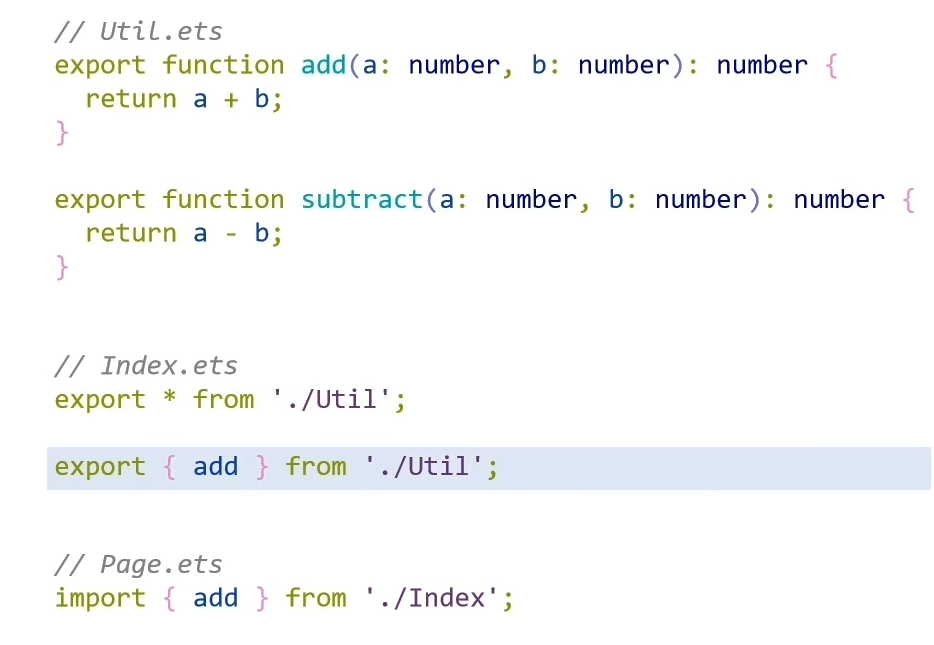
?导入
静态导入
动态导入
import支持条件延迟加载,提升页面的加载速度
// Test.ets
export function hello(){
	console.info('Hello');
}

// Page.ets
import('./Test').then(ns =>{
	ns.hello();
);下一篇ArkUI